
Auto-dialer
Dial back to back. Log every outcome.
Load a queue and let the dialer work through it with retries, pause codes, wrap-up time and calling hours. Every call is recorded and summarised, and a promise on the call becomes a task.
30-day free trial · Nothing charged for 30 days · Cancel anytime
Today's queue
Auto-dial onCall summary
Interested in Growth for 8 users. Wants the proposal by Thursday.
Task created: send proposal, Thursday
In the product
The dialer, in the real app
A live board for managers, a queue for callers
See who is on a call, wrapping up or on a break, then start the auto-dialer: callbacks first, then new and hot leads, with the reason for each call on screen.
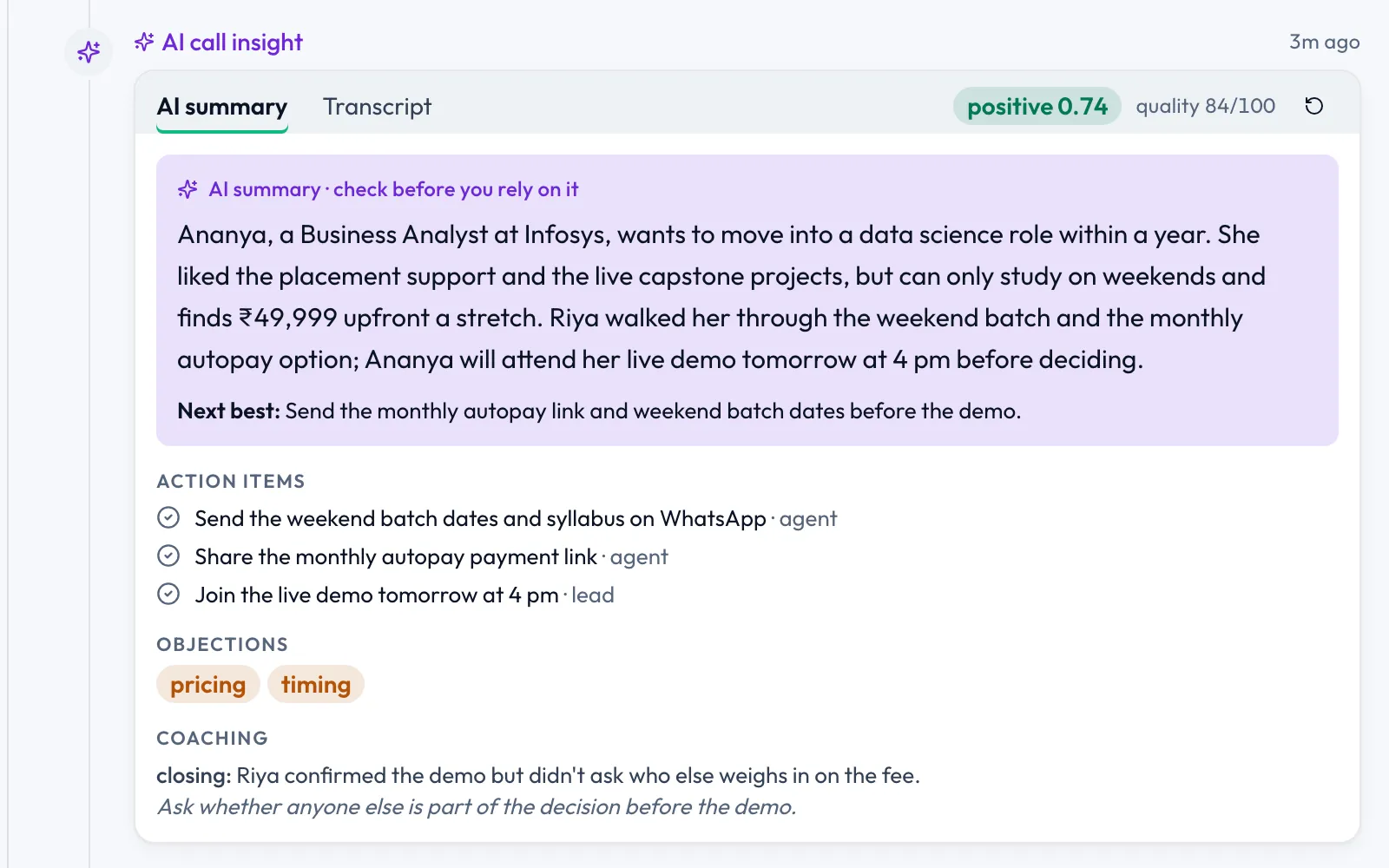
Every call writes its own summary
Sentiment, a quality score, action items, objections and a coaching note land on the lead after the call.
Recorded in the Supersei app. Names and amounts are sample data.
What you get
A dialer that writes its own follow-up
Click-to-call, an auto-dialer, recordings and AI summaries, with every outcome captured.
-
Auto-dialer with dial flows
Load a queue and dial back to back, with retries, pause codes, wrap-up time and calling hours.
-
One-click calling
Click the lead and talk. Every call logs itself.
-
Required call outcomes
The next call can't start until the last one is logged, with outcomes and lost reasons you define.
-
AI
Transcripts, summaries and sentiment
Hang up and the write-up is done: summary, action items, objections and sentiment.
-
AI
Promises become tasks
“I'll send it Thursday” becomes a dated task, and the pipeline moves itself.
-
Recording and playback
Every conversation saved and one click away.
-
Live dialer board
See every agent's state and breaks in real time.
-
Inbound call screen-pop
Incoming calls route through your chain and pop the lead's details before you answer.
-
Calls from personal phones
The Android app syncs call logs and recordings from reps' own phones.
How it works
From queue to next step
-
01
Build the queue
Pick the leads to call. Dial flows handle retries and calling hours for you.
-
02
Dial back to back
Each call connects with the lead's details on screen and a business caller ID.
-
03
Log the outcome
Reps pick from the outcomes you defined before the next call starts.
-
04
The write-up is done
Recording, transcript and summary land on the lead, and promises become dated tasks.
Pricing
Calling from Starter, auto-dial on Growth
Click-to-call with auto recording and the Android calling app come with Starter. The auto-dialer and AI call intelligence come with Growth at ₹1,999/seat a month, billed annually. Telephony uses 1 Sei Credit per minute, and Growth includes 1,500 minutes of transcription and AI summary per seat each month.
FAQ
Auto-dialer questions
Something else? Write to us or book a demo.
Yes. The Android app syncs call logs and recordings from reps' own phones to the CRM, and has its own dialer and auto-dial with outcome screens.
Plivo, Tata Smartflo and CallHippo for calling, with Deepgram and OpenAI Whisper for transcription.
Required call outcomes. The next call can't start until the last one is logged, with the outcomes and lost reasons you define.
Every call is recorded and one click away. After the call, the transcript, summary, action items, objections and sentiment are written for you.
Give every rep more talk time.
See a call queue run, a call summary write itself and the follow-up task appear, on one live demo.
Nothing charged for 30 days · Cancel anytime · GST invoice