
WhatsApp CRM
Turn WhatsApp chats into paid orders.
Connect the official WhatsApp Business API or the personal number your business already uses. Every chat lands in one shared inbox, on the lead's record, where your team and Sei can reply.
30-day free trial · Nothing charged for 30 days · Cancel anytime
Priya Sharma
WhatsAppHi, does the Growth plan include WhatsApp?
Sei · AIYes. Growth includes the official WhatsApp Business API inbox, plus web chat and email in one place.
Can I see it on a call first?
Sei · AIDone. Thursday 3:00 PM, Google Meet link sent to your WhatsApp.
Demo booked · lead stage updated
In the product
The shared inbox, in the real app
Watch the 67-second film: 11:47 PM WhatsApp enquiry to paid deal by 7:12 AM
A buyer messages on WhatsApp at night. Sei answers from your knowledge base, shares the brochure, books the demo, sends the Razorpay link and verifies payment while your team sleeps.
Sei drafts, your team sends, the ticks come back
A suggested reply appears under the chat, goes out on WhatsApp in one click and shows its delivery and read ticks on the thread.
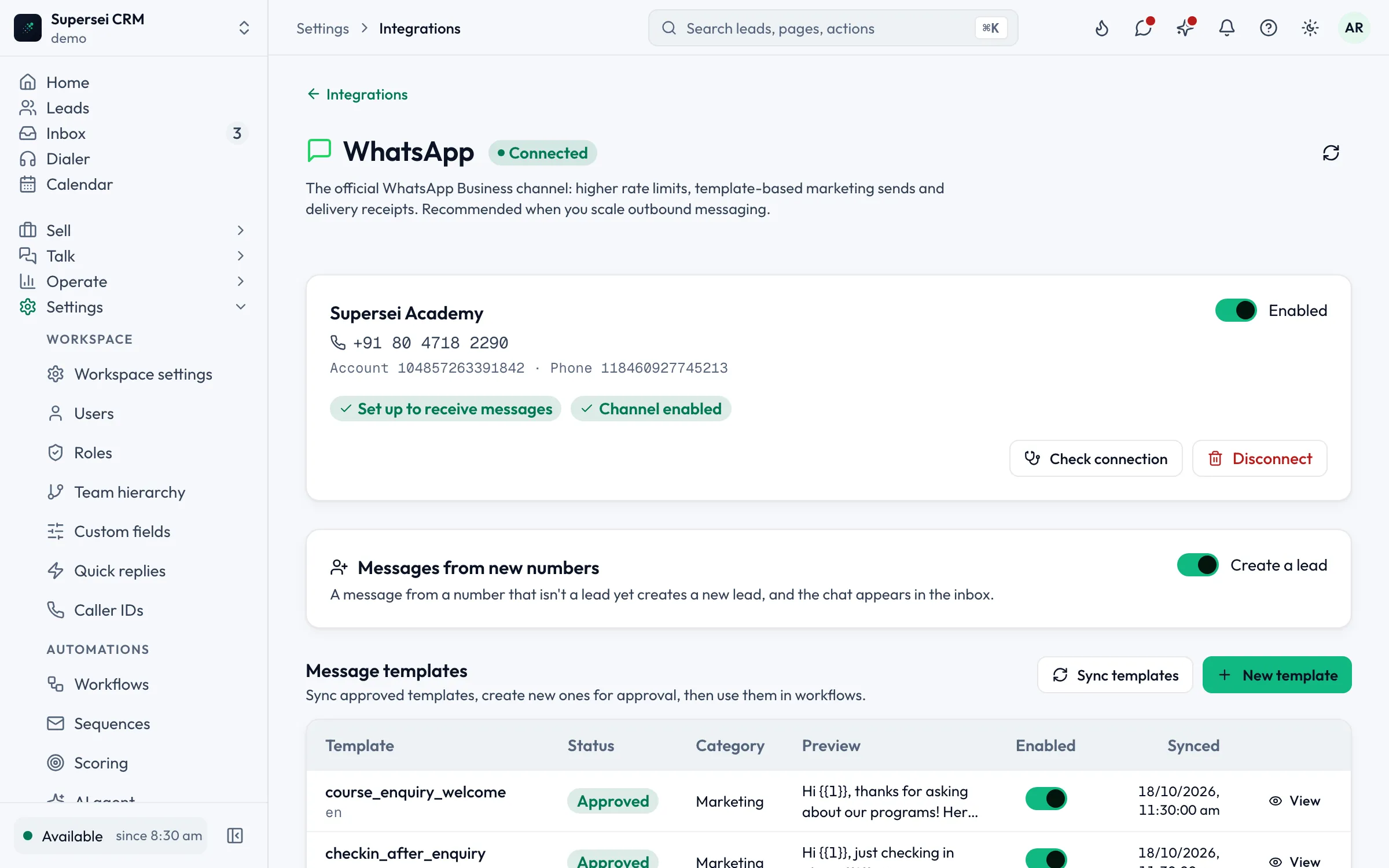
Your business number, connected
Once your WhatsApp Business number is linked, new numbers that message you become leads, and your approved templates sync in for campaigns and workflows.
Recorded in the Supersei app. Names and amounts are sample data.
What you get
Everything your team does on WhatsApp, in the CRM
A shared inbox for WhatsApp, website chat, Messenger and Instagram, plus each rep's own email.
-
Official WhatsApp Business API
Templates, delivery and read receipts from your business number, connected in minutes.
-
Personal WhatsApp via QR
Scan once and existing customer chats flow into the shared inbox.
-
Bulk template campaigns
Send approved templates in bulk, with STOP/START opt-out handled for you.
-
AI
Sei replies in seconds
Sei answers on WhatsApp from what your website says, shares the brochure and books the demo.
-
Team chat console
Anyone can pick up any conversation with full history, in real time.
-
Payment links in the chat
Send a Razorpay or Stripe link with GST while you talk. The deal flips to Won when the bank confirms.
-
WhatsApp meeting reminders
Reminders go out on WhatsApp at the times you choose.
-
Instant WhatsApp after a form fill
An automatic WhatsApp message reaches new website leads within minutes.
-
Quick replies
Canned answers your team can drop into any conversation.
How it works
From first message to paid order
-
01
Connect your number
Link an official WhatsApp Business number, or scan a QR code to bring in your personal one.
-
02
Every chat finds its lead
Chats land in the shared inbox and on the customer's timeline, next to calls, emails and payments.
-
03
Sei or your team replies
Sei answers, books the meeting and sends the payment link. Anything tricky goes to a person.
-
04
The deal closes itself
When the gateway confirms the payment, the order is marked paid and the deal flips to Won.
Pricing
WhatsApp is on every plan
Every plan includes a WhatsApp Business API inbox, starting with Starter at ₹999/seat a month, billed annually. Meta conversation charges apply. The omnichannel inbox with web chat and email comes with Growth.
FAQ
WhatsApp CRM questions
Something else? Write to us or book a demo.
Both ways. Connect an official WhatsApp Business number with approved templates and live delivery and read ticks, or link the personal number your business already uses by scanning a QR code. Every chat lands in the shared inbox where your team and Sei can reply.
Yes. Every plan includes a WhatsApp Business API inbox. Meta conversation charges apply.
Yes. Send approved templates in bulk as a campaign. STOP and START opt-outs are handled for you.
Sei hands over. Your team gets the full story, Sei goes quiet on that thread, and your agent picks up in the same inbox.
Answer every WhatsApp lead in seconds.
See a WhatsApp enquiry arrive, Sei reply, a meeting book and a payment land, on one live demo.
Nothing charged for 30 days · Cancel anytime · GST invoice