
Imagine a sales manager in Pune. She opens her CRM at 10 am on Monday. Over the weekend her Meta and Google campaigns brought in 140 enquiries. Sixty are still marked “New”. Nobody has called them.
The ads worked. The leads arrived. What failed was the step in between: deciding which rep should call which lead, and making sure that happens quickly.
That step is a software problem, and it is easy to forget to test.
Supersei is a CRM for Indian sales teams that brings WhatsApp chats, Meta and Google ad leads and follow-ups into one place. The rest of this guide is a vendor-neutral checklist you can use to test any CRM, Supersei included.
Why do paid leads go cold so quickly?
A person who fills in an ad form is interested at that moment. An hour later they may be in a meeting, comparing three other vendors, or no longer interested.
Harvard Business Review published research on this under the title “The Short Life of Online Sales Leads”. Its authors report that most companies are not responding “nearly fast enough” (Oldroyd, McElheran and Elkington, Harvard Business Review, 2011) to online enquiries. The abstract gives no exact timings, so treat it as a direction, not a number.
This means the cost of slow follow-up is real, but only you can measure it for your own business. Start by checking how long your newest leads wait today. See also our article on the five-minute rule for Indian sales teams.
What happens to a Meta or Google lead before it reaches your CRM?
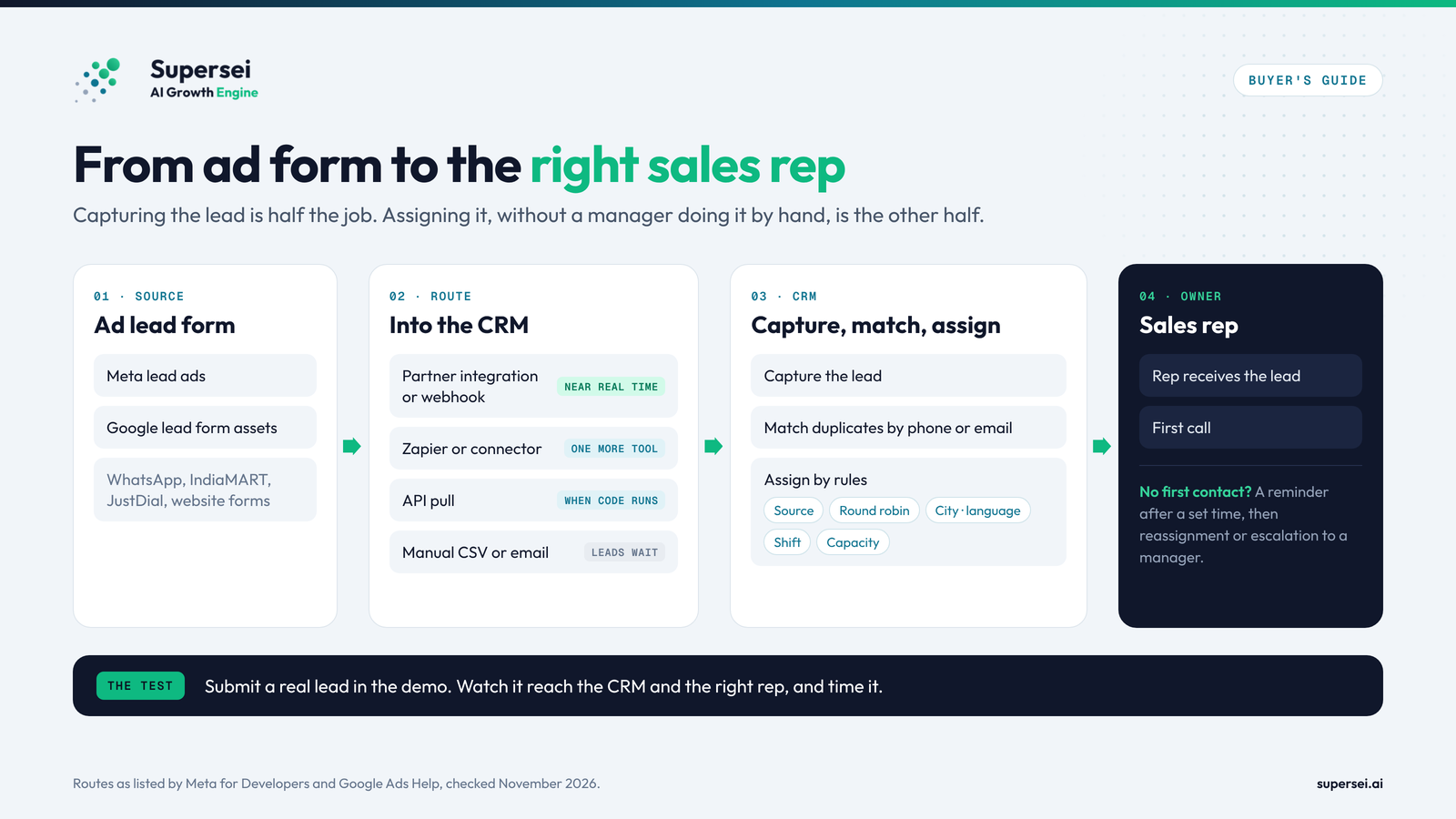
A lead form does not send anything to your CRM by itself. Each platform offers several routes, and the route decides how fast the lead arrives and how much work your team does.
Meta describes four ways to get lead ad data into a CRM: a partner integration, webhooks, a pull through its Graph API, and manual download. Meta says webhooks “can give you leads close to real time”, and that manual download is not recommended for CRMs (Meta for Developers, “Connecting Your CRM to Download Leads”, checked November 2026).
Google lists five routes for lead form assets: CSV download, email alerts, the Google Ads API, a webhook and Zapier. It also warns that Google Ads stores leads for 60 days, and that manual CSV export covers only the last 30 days (Google Ads Help, “About lead form assets”, checked November 2026).
| Route | What it needs | Main risk |
|---|---|---|
| Partner integration or webhook | Set up once, then automatic | Breaks silently if the connection expires, so test it monthly |
| Zapier or similar connector | A third-party account and mapping | One more tool to maintain and pay for |
| API pull | Developer time | Leads arrive when the code runs, not when the form is filled |
| Manual CSV or email alerts | A person doing the work | Leads wait for someone to download them; Google deletes them after 60 days |
This means the first test of any CRM is simple: ask for a live demonstration where a test lead is submitted on a real form and appears in the CRM, with the time shown.
How should a CRM assign ad leads to sales reps?
Capturing the lead is half the job. The other half is assignment: choosing the right person without a manager doing it by hand. A good CRM supports several rules, and most teams use a mix.
- By source or campaign. Leads from a high-value Google search campaign go to your senior reps. Leads from a broad Meta awareness form go to a new team.
- Round robin. Each new lead goes to the next rep in turn, so nobody is favoured. Check that it skips reps who are absent.
- By city, language or product. A Hindi-speaking lead from Jaipur should not land with a rep who only works in English on a different product.
- By shift. Leads that arrive at 9 pm should go to whoever is working, or wait for the morning queue, not to a rep who finished at 6.
- By capacity. A rep who already has 40 open leads should not receive the 41st while a colleague has five.
Indian teams also receive leads from WhatsApp, IndiaMART, Justdial and website forms. Ask whether the same assignment rules apply to those sources too.
A single rule is rarely enough. Ask whether rules can be combined, and who is allowed to change them.
The six-question checklist for any CRM vendor
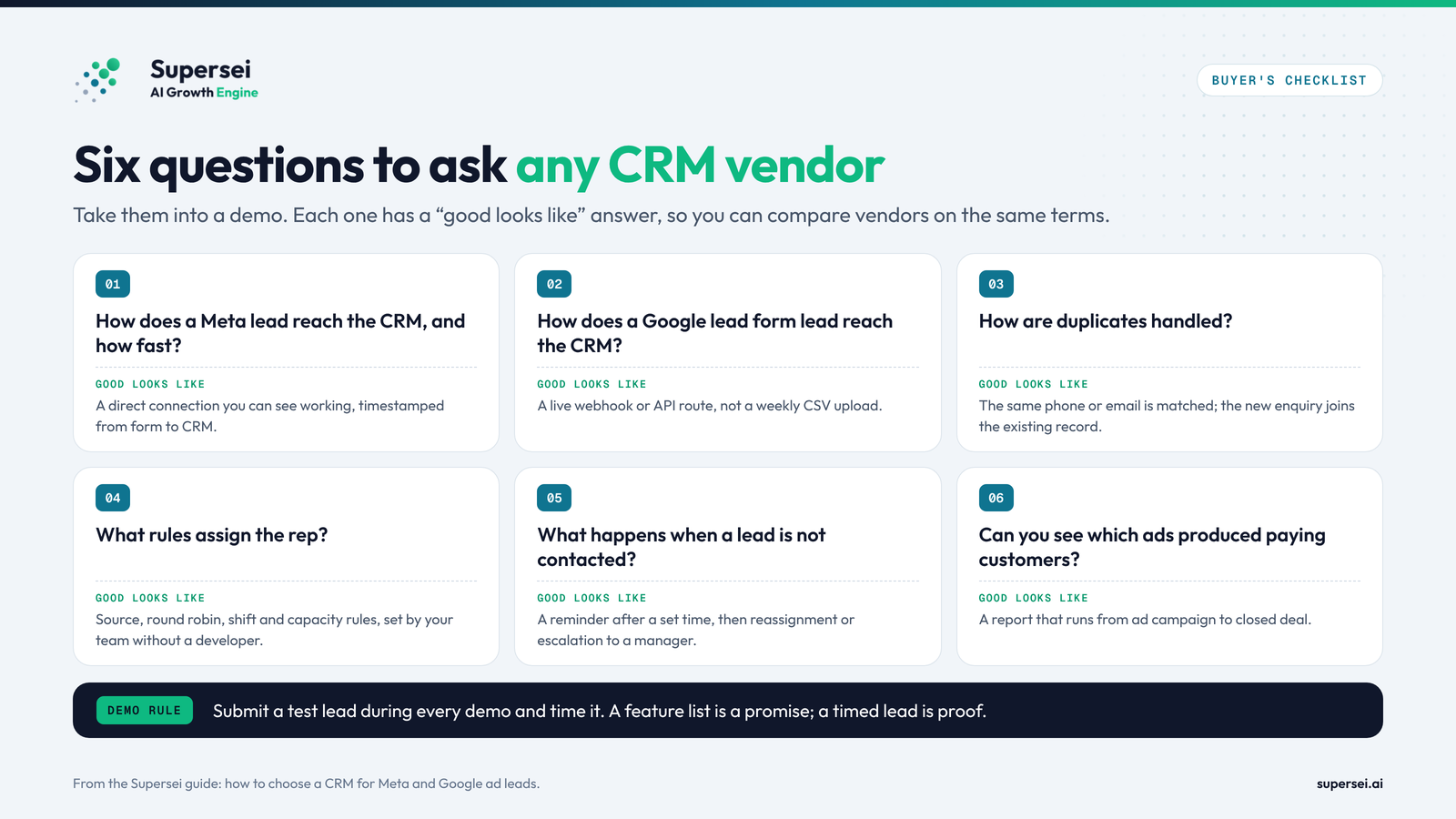
Use these in a demo. Each has a “good looks like” answer, so you can compare vendors on the same terms.
- How does a Meta lead reach the CRM, and how fast? Good looks like: a direct connection that you can see working, with a timestamp from form submission to CRM entry.
- How does a Google lead form lead reach the CRM? Good looks like: a live webhook or API route, not a weekly CSV upload.
- How are duplicates handled? Good looks like: the same phone number or email is matched, and the new enquiry is added to the existing record instead of creating a second one.
- What rules assign the rep? Good looks like: source, round robin, shift and capacity rules, set by your team without a developer.
- What happens when a lead is not contacted? Good looks like: a reminder after a set time, then reassignment or escalation to a manager.
- Can you see which ads produced paying customers? Good looks like: a report from ad campaign to closed deal. See our article on ad attribution beyond cost per lead.
Common mistakes when buying a CRM for ad leads
1. Judging by the feature list, not by a live test
Every vendor page lists “lead capture”. Only a test lead tells you how long it takes and whether it lands in the right place.
2. Forgetting about duplicates
A person may submit a Meta form and a Google form in the same week. Without matching, two reps call the same person, and the buyer notices.
3. Leaving unassigned leads unmonitored
Even good rules fail when a rep is on leave. A CRM should flag leads with no owner or no first call. Related reading: stopping lead poaching in sales teams.
4. Trusting a connection that was set up once
Platform connections can expire when a password or permission changes. Add a monthly test lead to your calendar.
Three quick examples
These scenarios are illustrative examples, not real client results.
Scenario A: a coaching institute in Kota. Leads from Meta are downloaded as a CSV every Friday. By then, most are a week old. Result: the team spends Monday calling people who have already enrolled elsewhere.
Scenario B: a real estate team in Bengaluru. A webhook sends leads to the CRM within moments. Round robin assigns each lead, but no rule skips absent reps. Result: leads sent to a rep on leave wait two days. Capture was fixed; assignment was not.
Scenario C: a loan agency in Ahmedabad. Google and Meta leads connect directly. Rules assign by city and shift, duplicates merge, and untouched leads move to a manager after a set time. Result: the manager sees a short list of exceptions each morning instead of a long list of new leads.
What should you do this week?
Step 1: Measure your current wait
Pull the last 30 days of leads. For each, note the time the form was filled and the time of the first call. The average gap is your baseline. Read how lead capture works with your forms.
Step 2: Write down your assignment rules
List how you want leads split: by campaign, city, language, shift and capacity. If you cannot write the rules in ten lines, simplify them before you shop for a CRM.
Step 3: Run the six questions in two demos
Submit a test lead during each demo and time it. Then compare the answers side by side. When you are ready to see this with your own forms, you can book a demo.
Frequently asked questions
How does a CRM get leads from Meta and Google lead ads?
Through an integration. Meta lists partner integrations, webhooks, a Graph API pull and manual download. Google lists a webhook, the Google Ads API, Zapier, email alerts and CSV download. Webhooks and direct connections are the quickest routes, because nobody has to download a file.
Can leads be assigned to reps who are on shift?
Yes, if the CRM supports shift-based rules. Ask whether it can skip absent reps and what happens to leads that arrive outside working hours.
What happens to leads nobody touches?
In a well set up CRM, a lead with no first contact after a set time is reminded, then reassigned or escalated. Without that rule, it stays in the queue unnoticed.
How long does Google keep lead form leads?
Google Ads stores them for 60 days, and manual CSV download covers the last 30 days. Connect a CRM so you do not have to rely on those limits.
Do I need a developer to connect Meta and Google leads?
Not always. Partner integrations and connectors are set up without code. Webhook and API routes may need developer time. Ask the vendor who does that work and how long it takes.
Can the same rules assign leads from WhatsApp, IndiaMART, Justdial or my website form?
It depends on the CRM. Ask the vendor which lead sources connect directly, and whether one set of assignment rules covers all of them or each source needs its own.
What is the difference between lead capture and lead assignment?
Capture is getting the lead into the CRM. Assignment is deciding which rep owns it. Many buyers test only capture and then discover that assignment was manual all along.
Bottom line
- A paid lead is usually worth most soon after the form is filled.
- Ask how each lead arrives, not whether it can.
- Write your assignment rules before you shop.
- Test with a real lead, and time it.
- Fix the gap between capture and the first call.
The best test of any CRM is still the simplest one. Submit a real lead, then watch where it goes and how fast. If it reaches the right rep without anyone touching it, you have found a CRM worth shortlisting.
Want to see lead capture and assignment on your own forms? Book a demo with Supersei.